Digital wardrobe app for the clothes you already own
Most people wear a fraction of what hangs in their closet. Run a 20-second closet utilization audit below to see what sits unworn — then digitize up to 100 pieces free with on-device privacy in StyleTwin.
Last updated: November 29, 2026
The short answer: a digital wardrobe app puts every piece of clothing you own onto your phone so you can filter by color, warmth or occasion, see how many outfits you can make, and stop re-buying duplicates. StyleTwin (formerly Wearbird) is a free digital closet app for iPhone, iPad and Android — up to 100 pieces free, no ads, zero sign-up required, and closet photos stay privately on your phone.
Digitize up to 100 pieces free with automatic on-device cutouts, zero ads, and no account required.
Get it on the App StoreGet it on Google Play
Free up to 100 pieces · No ads · On-device privacy · iPhone, iPad & Android
How to digitize your closet without spending a weekend
The biggest reason people quit digital wardrobe apps is tedious setup. StyleTwin is built to get your favorite 20 to 50 items digitized in minutes:
- Start with what you actually reach for. Photograph pieces from your camera, select existing shots from Photos, or grab clean frames from a quick video walkthrough of your closet.
- Automatic on-device cutouts and tags (free). StyleTwin removes each background and detects category, color, warmth (light, mid, warm) and dressiness locally on your phone — no waiting on cloud queues and no credits used.
- Split full-outfit photos with Lift with AI. Already have mirror selfies or outfit photos? Lift with AI extracts every garment in one photo into clean individual product shots for 1 AI credit per photo (new users get 5 free AI pictures across their first two weeks).
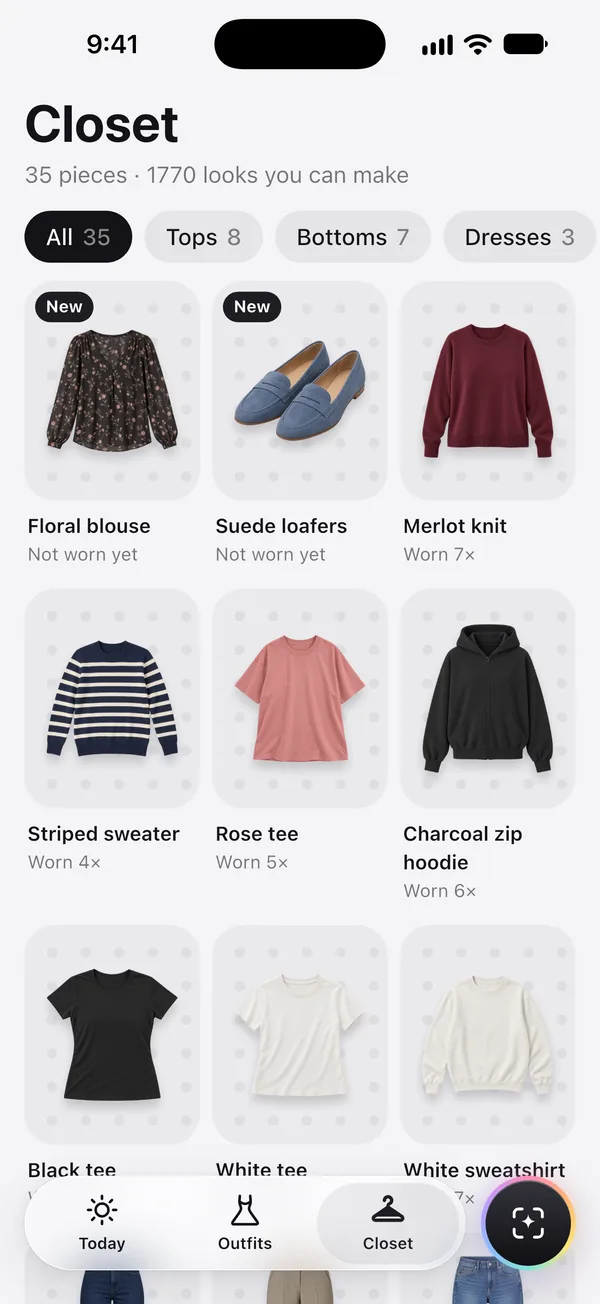
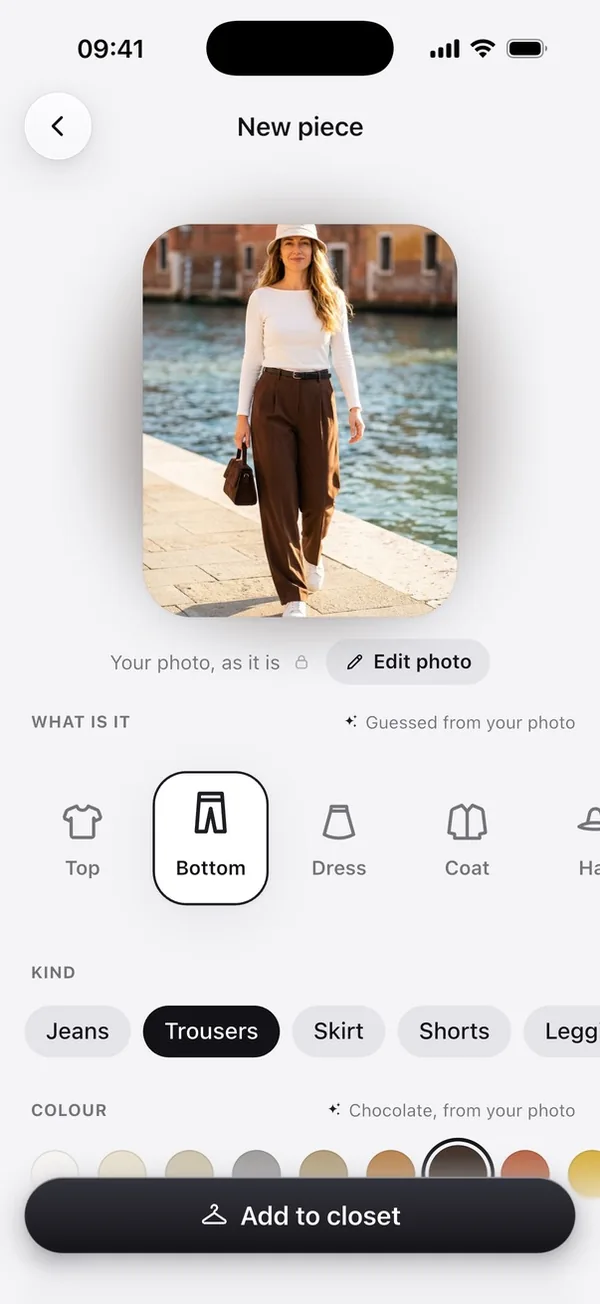
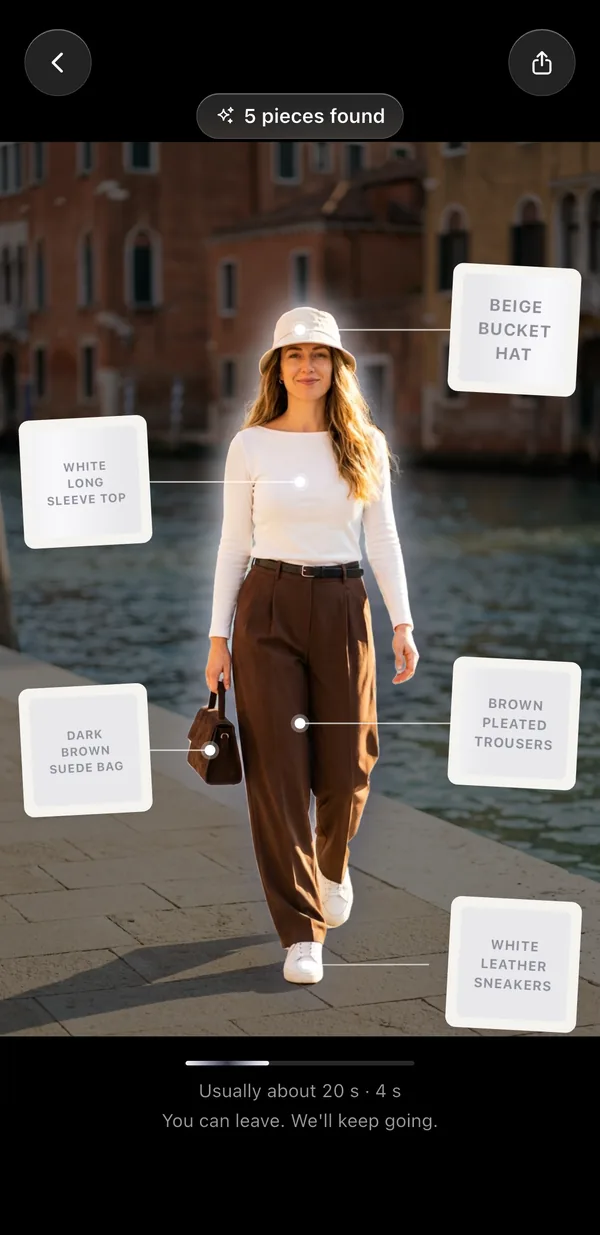
Every piece cut out cleanly on your phone, tagged by color and warmth, with your total outfit count up front.
Get it on the App StoreGet it on Google Play
Free up to 100 pieces · No ads · On-device privacy · iPhone, iPad & Android
What a digital wardrobe unlocks every morning
- Instant outfit math. StyleTwin calculates how many looks your digitized clothes can create (for example, 35 pieces making 1,770 combinations). Preview the math in our outfit combinations calculator.
- Smart filters when you need them. Filter by color, warmth, dressiness, most worn, least worn, lowest cost per wear, or Not worn in 30 days.
- Color palette & closet gaps. See which neutrals and accent colors dominate your closet, spot pieces that have zero saved outfits yet, and let StyleTwin name the one missing item that would add the most new looks.
- Real-closet AI everywhere. Use your digitized closet inside the weekly outfit planner, weather outfits, virtual try-on, outfit tracker, and even ChatGPT and Claude via MCP.
Free digital wardrobe vs. StyleTwin Plus
| Feature | StyleTwin Free | StyleTwin Plus ($39.99/yr or $9.99/mo) |
|---|---|---|
| Closet size | Up to 100 of your own pieces | Unlimited pieces |
| Ads & account | Zero ads · no account needed | Zero ads |
| Background removal & tagging | Free & unlimited on-device | Free & unlimited on-device |
| Weather & weekly planning | Free & unlimited | Free & unlimited |
| AI stylist answers | 3 free every week | Unlimited |
| AI pictures (Try-on & Lift) | 3 at launch + 2 in first 2 weeks | 10 every month + 25% bonus on packs |
| Closet stats & Trips | Core wear counts & monthly view | Full cost-per-wear stats & multi-city Trips |
Comparing digital closet apps? Read our honest reviews of StyleTwin vs Whering, StyleTwin vs Acloset, StyleTwin vs Alta, and StyleTwin vs Stylebook, or browse shop your closet.
Privacy first
- Closet photos stay stored on your phone — StyleTwin does not force cloud uploads to catalog your wardrobe.
- Available natively on iPhone and iPad (iOS 17.6 or later) and Android (Android 12 or later) in 20 languages.
Questions
What is the best free digital wardrobe app with no ads?
StyleTwin is a free digital wardrobe app for iPhone, iPad and Android with zero ads and no account required to start. You can catalog up to 100 pieces free with automatic on-device background removal, weather outfit ideas, and weekly calendar planning.
How many pieces should I add first when digitizing my closet?
Start with 20 to 30 pieces you wear right now in the current season — about 6 tops, 4 bottoms, 2 dresses or knits, 2 coats, 2–3 pairs of shoes and 1–2 bags. That takes around 10 minutes and immediately unlocks dozens of real daily outfits.
Does StyleTwin remove backgrounds from my clothing photos automatically?
Yes. Background removal, category detection, color tagging and warmth estimates all run locally on your phone for free with zero AI credits.
Can I add multiple clothes from one outfit photo?
Yes. With Lift with AI, choose one full-outfit photo and StyleTwin turns every piece it detects into an individual studio-style cutout for 1 AI credit per photo. New users get 5 free AI credits in their first two weeks.
Where are my digital closet photos stored?
On your device. StyleTwin keeps your closet images on your phone rather than uploading your whole wardrobe to a server. A photo leaves your phone only if you explicitly invoke an AI picture feature (deleted within 48 hours, never used for model training) or opt into Share closet pictures for AI chats.
How do I track cost per wear in my digital wardrobe?
Add what you paid to any item (private on your device), then tap Wear this whenever you wear an outfit. StyleTwin updates each piece’s cost per wear automatically. Try the formula in our cost per wear calculator or see our outfit tracker.
StyleTwin is free on iPhone, iPad and Android.
Get it on the App StoreGet it on Google Play
Free up to 100 pieces · No ads · On-device privacy · iPhone, iPad & Android