Free AI outfit generator from your own closet
Pick an occasion, weather, and style vibe to generate balanced outfits right here. Lock any piece you love and remix the rest — then generate unlimited daily looks from your own clothes in the free StyleTwin app.
Last updated: November 29, 2026
The short answer: use the interactive AI outfit generator below to remix complete outfits by occasion, temperature and style with zero sign-up. In the StyleTwin app (iPhone, iPad and Android), every generated outfit uses only clothes already in your closet — matched to Apple Weather, color harmony and your calendar — with no ads and up to 100 pieces free.
Generate outfits exclusively from clothes you own — free up to 100 pieces, no ads, on iPhone, iPad and Android.
Get it on the App StoreGet it on Google Play
Free up to 100 pieces · No ads · On-device privacy · iPhone, iPad & Android
How StyleTwin generates wearable outfits (not random pairings)
Random outfit wheels throw mismatched textures and clashing colors together. StyleTwin’s outfit engine scores four real styling rules on every look:
- Occasion and formality match. Work, casual errands, smart dinner, weekend and travel each set clear boundaries so gym sneakers never collide with cocktail pieces.
- Weather and layer warmth. Cool forecasts automatically pull a mid-layer or coat; mild and warm settings drop heavy wool so the outfit actually feels comfortable outside. Test exact temperatures in our weather outfit checker.
- Color harmony scoring. Looks prioritize proven wardrobe palettes — neutrals plus one accent color, tonal neighbors, or high-contrast neutrals — explained in our outfit color-combo matcher.
- Piece locking and remixing. Already know you want to wear a specific jacket, pair of trousers, or boots? Lock that anchor piece and generate fresh combinations around it in one tap.
Three ways to generate outfits from your own closet in StyleTwin
Most AI outfit generators invent clothes you do not own and push affiliate links. StyleTwin starts from your real digital wardrobe:
- Instant daily ideas on Today (0 credits). Open the app and see ready-to-wear outfits calculated locally on your phone for today’s weather and calendar events, avoiding clothes you just wore.
- Ask for a look in your own words (free up to 30/day). Type “rooftop dinner, cool evening, no heels” or tap a quick chip like Interview, Rain all day, or Date night. StyleTwin replies with up to three real outfits from your closet — or names the single missing piece that would unlock the look.
- Second opinion from your AI stylist — or ChatGPT and Claude. Ask StyleTwin’s AI stylist (3 free answers/week; unlimited in Plus) for one-tap Try it swaps, or connect your closet to ChatGPT and Claude via MCP at https://api.styletwin.app/mcp.
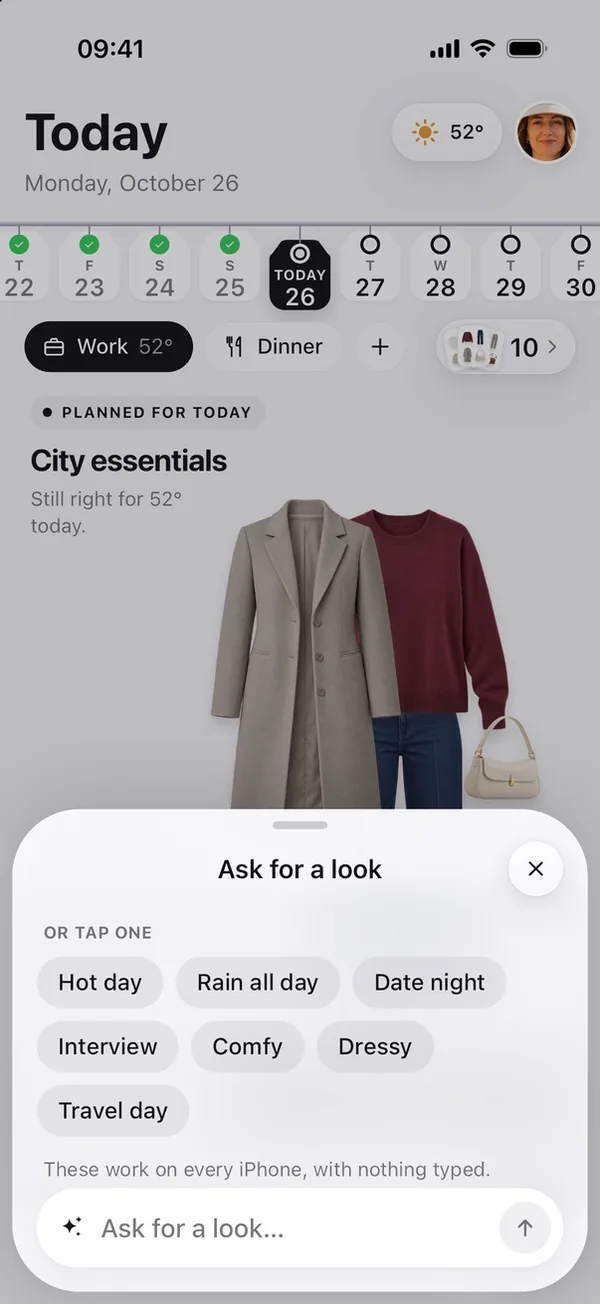
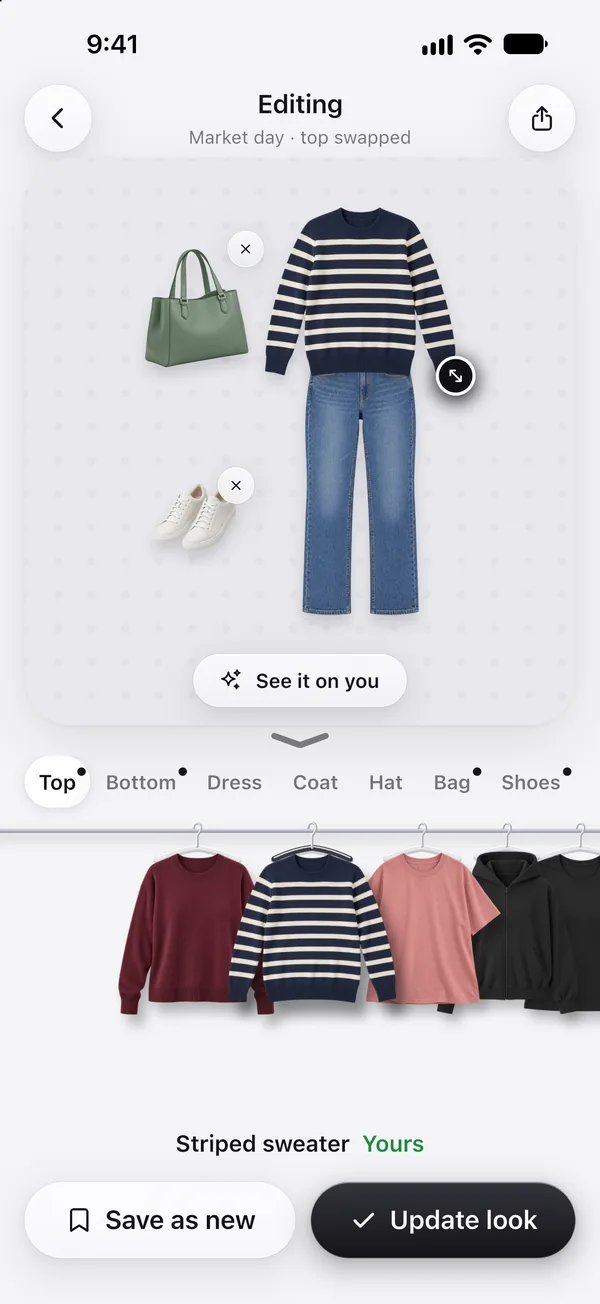
Ask for a look in plain English or tap a quick occasion to generate outfits from your real wardrobe.
Get it on the App StoreGet it on Google Play
Free up to 100 pieces · No ads · On-device privacy · iPhone, iPad & Android
Choosing the right StyleTwin outfit engine
| Tool in StyleTwin | Best for | Cost | Privacy |
|---|---|---|---|
| Today’s weather ideas | Instant daily & weekly looks | Free, unlimited (0 credits) | Runs 100% on your phone |
| Ask for a look | Specific requests (“rainy office day”) | Free up to 30 times/day | Sends text metadata only (no photos) |
| AI stylist | Critique & one-tap swap advice | 3 free/week · unlimited in Plus | Text metadata only (no photos) |
| ChatGPT & Claude (MCP) | Conversational planning in your AI chat | Free core access via MCP | Controlled toggles in You → AI chats |
| Virtual try-on (Create with AI) | Seeing the generated look on your photo | 1 credit (5 free in first 2 weeks) | Deleted within 48h; never trains models |
Prefer hands-on mixing piece by piece? Open our outfit maker. Ready to drop generated looks onto Monday through Sunday? Use the outfit planner, or browse ready-to-wear templates in work outfit inspiration and minimal outfit inspiration.
Good to know
- The browser outfit generator above needs no sign-up and lets you save a PNG outfit card straight to your device.
- StyleTwin is free to download on iPhone, iPad and Android with no ads, up to 100 pieces free, and no account required to start.
- Optional StyleTwin Plus ($39.99/year or $9.99/month) unlocks unlimited closet items, unlimited AI stylist answers, 10 monthly AI pictures, full stats and multi-city Trips.
Questions
Is there a free AI outfit generator that uses my own clothes?
Yes. StyleTwin is free to download on iPhone, iPad and Android with no ads and up to 100 pieces free. Every outfit generated on Today, through Ask for a look, or by the AI stylist uses strictly the garments you added to your closet.
Can I try an AI outfit generator online without signing up?
Yes. The interactive generator at the top of this page works directly in your browser with zero account or download. Select an occasion, weather and vibe, lock pieces you want to keep, remix combinations, and export your outfit card as an image.
How does the AI outfit generator pick colors that actually match?
It evaluates each combination using wardrobe color harmony rules: pairing neutrals with one accent color, tonal color-wheel neighbors, or balanced light-and-dark neutrals. Each generated look displays a short color harmony rationale explaining why the pieces work together.
Can I generate outfits around one specific item I want to wear?
Yes. In the browser generator above, tap the lock toggle on any slot (top, bottom, outer layer or shoes) and press Remix Outfit. Inside the StyleTwin app, tap Dress me in it on any piece in your closet to generate looks centered on that item.
Does an AI outfit generator work for men’s and women’s clothes?
Yes. StyleTwin supports both women’s and men’s wardrobes across Minimal, Classic, Smart Casual and Streetwear aesthetics, and in the mobile app it works entirely from whichever pieces you add to your closet.
Can ChatGPT or Claude act as my AI outfit generator with StyleTwin?
Yes. Connect StyleTwin’s remote MCP server (https://api.styletwin.app/mcp) in Claude or ChatGPT so your AI chat can read your real wardrobe, check local weather, and propose outfits from clothes you actually own. See AI chats.
How does StyleTwin compare to other AI outfit apps?
StyleTwin focuses on privacy (closet photos stay on your phone), zero ads on the free tier, real-photo virtual try-on instead of avatars, and native ChatGPT/Claude MCP access. Compare options in Best AI stylist apps (2026).
StyleTwin is free on iPhone, iPad and Android.
Get it on the App StoreGet it on Google Play
Free up to 100 pieces · No ads · On-device privacy · iPhone, iPad & Android