An AI stylist app for the clothes you already own
Not sure if an outfit works? Ask StyleTwin’s AI stylist. It looks at the outfit and the clothes in your closet, tells you what works and why, and suggests swaps from pieces you already own—never pushing you to buy.
Last updated: November 27, 2026
The short answer: open any outfit—or your closet—and ask your AI stylist what works, which top, shoes or bag fits best, or what’s missing. You get 3 free AI stylist answers every week (and unlimited answers with StyleTwin Plus), plus instant, unlimited rule-based feedback on your phone.
Get a second opinion on any outfit from your own closet. Free to download on iPhone, iPad and Android.
Get it on the App StoreGet it on Google Play
Free up to 100 pieces · No ads · On-device privacy · iPhone, iPad & Android
How the AI stylist works
- Ask about any look. Put an outfit together in the fitting room or open one of Today’s ideas, then ask your stylist: “Does this work for dinner on Friday?”, “Which top works best?”, or tap Rate today’s look.
- See what works and why. StyleTwin checks your colours, dressiness, patterns and occasion, explains why a piece works or clashes, and suggests specific swaps from clothes you already own.
- Tap Try it. One tap puts the stylist’s swap straight onto your outfit board. From there you can plan it for a day or see it on your own photo with See it on you.
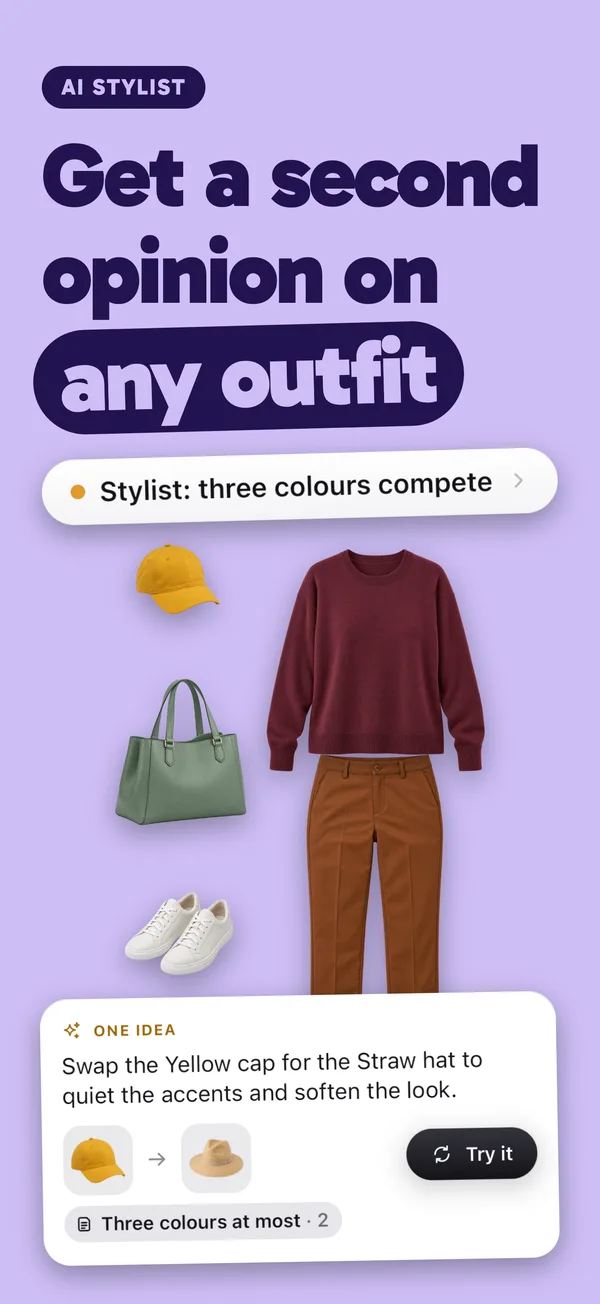
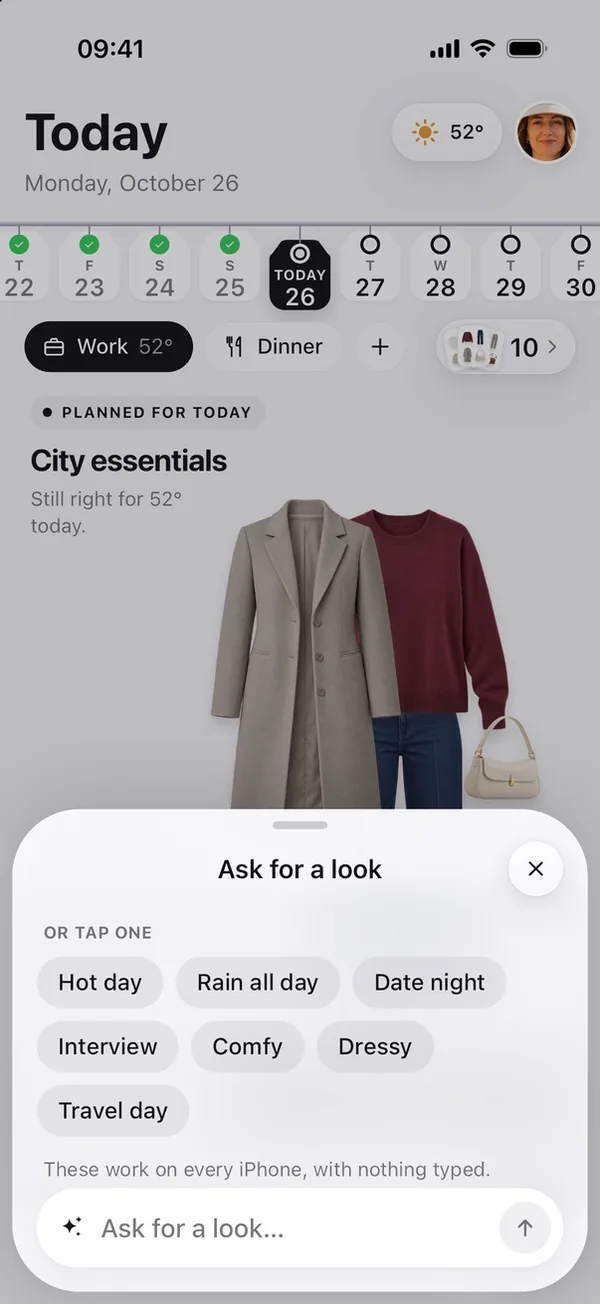
Ask your stylist about any look, then tap Try it to put the suggested swap straight onto your outfit.
Get it on the App StoreGet it on Google Play
Free up to 100 pieces · No ads · On-device privacy · iPhone, iPad & Android
What you can ask your AI stylist
- A second opinion on an outfit. “Does this work for a gallery opening?”, “Are these sneakers too casual for the blazer?”, or “How do I make this warmer without losing the shape?”
- Piece swaps from your own closet. “Which bag works best with this?”, “What shoes go with these olive trousers?”, or “Give me a dressier top for tonight.”
- Closet review and gaps. Tap Review my closet or ask “What’s missing in my closet?” to see your palette balance, casual-to-smart mix, unworn pieces, and the one item that would unlock the most new outfits.
- Occasion and weather looks. With Ask for a look, type what you need—like “dinner Friday, not too dressy” or “rain all day, no heels”—or tap a quick choice to get up to three complete outfits from your own closet, free up to 30 times a day.
Works even offline, with no shopping spam
Most AI styling apps either lock everything behind a paywall or try to sell you new clothes on every screen. StyleTwin works differently:
- Your closet first. Every suggestion uses clothes you already own, with no shopping links unless you explicitly ask for them.
- On-device style rules always on. Even if you are offline, pause AI features, or use up this week’s 3 free AI answers, StyleTwin’s built-in style rules still flag colour clashes, competing patterns, formality mismatches and shoes that feel too casual or sporty.
- Also inside ChatGPT and Claude. Want longer styling conversations on desktop or mobile? Connect your StyleTwin closet to ChatGPT or Claude via MCP at no extra cost. See StyleTwin in ChatGPT and Claude.
Pricing and platforms
| Feature | Free | StyleTwin Plus |
|---|---|---|
| AI stylist chat answers | 3 free answers every week | Unlimited |
| On-device style rule checks | Unlimited | Unlimited |
| Ask for a look (occasion & weather) | Up to 30 times a day | Up to 30 times a day |
| Digital closet | Up to 100 of your own pieces | Unlimited pieces |
| AI pictures (Lift with AI & try-on) | 3 free at start + 2 more in first two weeks | 10 AI pictures every month |
StyleTwin is free to download with no ads and no account needed to start on iPhone, iPad (iOS 17.6 or later) and Android (Android 12 or later). StyleTwin Plus is optional: $39.99 a year ($3.33 a month) with a 7-day free trial, or $9.99 a month in the US. See StyleTwin Plus.
Comparing AI stylists? See Best AI stylist apps (2026), compared and AI outfit planner.
Good to know
- Your closet photos stay on your phone. When you ask the AI stylist, StyleTwin sends only your question and a text list of your pieces (names, colours and kinds—never your photos).
- Chats are kept on your phone for the day, and if an AI stylist turn fails, your free weekly answer is not counted.
- AI features are opt-in and can be turned off at any time in the app.
Questions
What is the best free AI stylist app for clothes I already own?
StyleTwin is a free AI stylist app for iPhone, iPad and Android that styles only the clothes you own. You get 3 free AI stylist answers every week, unlimited on-device style rule checks, and free Ask for a look outfit ideas for your weather and calendar. For a full comparison of 13 options, see Best AI stylist apps (2026), compared.
How does StyleTwin’s AI stylist work?
Open an outfit or your closet and ask a question—such as whether a look works for an occasion, which top or shoes fit best, or what’s missing from your wardrobe. The stylist reads your question alongside the pieces in your closet, explains what works and why, and offers one-tap Try it swaps using your own clothes.
Is StyleTwin’s AI stylist free?
Yes. Every user gets 3 free AI stylist answers per week, unlimited rule-based outfit checks on the phone, and up to 30 free Ask for a look requests a day. If you want unlimited AI stylist answers every week, StyleTwin Plus is optional from $3.33 a month ($39.99 a year with a 7-day free trial).
Does the AI stylist see my photos?
No. Your closet photos stay on your phone. The AI stylist only sends your typed words and a text list of your pieces (names, colours and kinds). Photos leave your phone only when you explicitly use an AI image feature like Lift with AI or Create with AI, and our server deletes them within 48 hours.
Does the AI stylist push me to buy new clothes?
No. StyleTwin styles the clothes you already own first and shows no shopping links in stylist answers unless you ask for them.
Does the AI stylist app work on Android and iPad?
Yes. StyleTwin runs on iPhone and iPad (iOS 17.6 or later, with a dedicated iPad layout) and Android (Android 12 or later), with the same AI stylist, free tier and StyleTwin Plus plans across both platforms.
StyleTwin is free on iPhone, iPad and Android.
Get it on the App StoreGet it on Google Play
Free up to 100 pieces · No ads · On-device privacy · iPhone, iPad & Android