Virtual try-on: try clothes on your own photo
See how an outfit from your own closet actually looks on you before getting dressed. Slide the live before-and-after preview or check your full-length photo privately on your device below — nothing is uploaded.
Last updated: November 29, 2026
The short answer: StyleTwin lets you try on clothes from your own wardrobe on a real full-length photo of yourself — never a generic 3D avatar. Preview any outfit beside your photo free on your phone with Lookbook, or tap Create with AI to wear the look directly on your photo for 1 AI credit (new users get 3 free AI pictures at launch plus 2 more in their first two weeks).
Try outfits from your own closet on your real photo — 3 free AI pictures (+2 more in your first two weeks) on iPhone, iPad and Android.
Get it on the App StoreGet it on Google Play
Free up to 100 pieces · No ads · On-device privacy · iPhone, iPad & Android
How AI virtual try-on works with your real wardrobe
Most virtual try-on tools only let you test clothes a store wants to sell you. StyleTwin works with the pieces already hanging in your closet so you can test new combinations, layer coats over dresses, or check whether a silhouette works before changing outfits three times.
- Pick one head-to-toe photo. Take a clean mirror photo or choose one from your camera roll. StyleTwin checks five basics locally on your phone: one person, head to toe, framing distance, resolution (800 px+ short side) and sharpness.
- Choose any outfit from your closet. Mix pieces in the outfit maker, generate ideas in the AI outfit generator, or open a day from your outfit planner.
- Preview free or render with AI. Lookbook cuts you out on-device next to your pieces instantly for free. Create with AI dresses your actual photo in the selected items so only the clothes change — keeping your face, hair, posture and background intact.
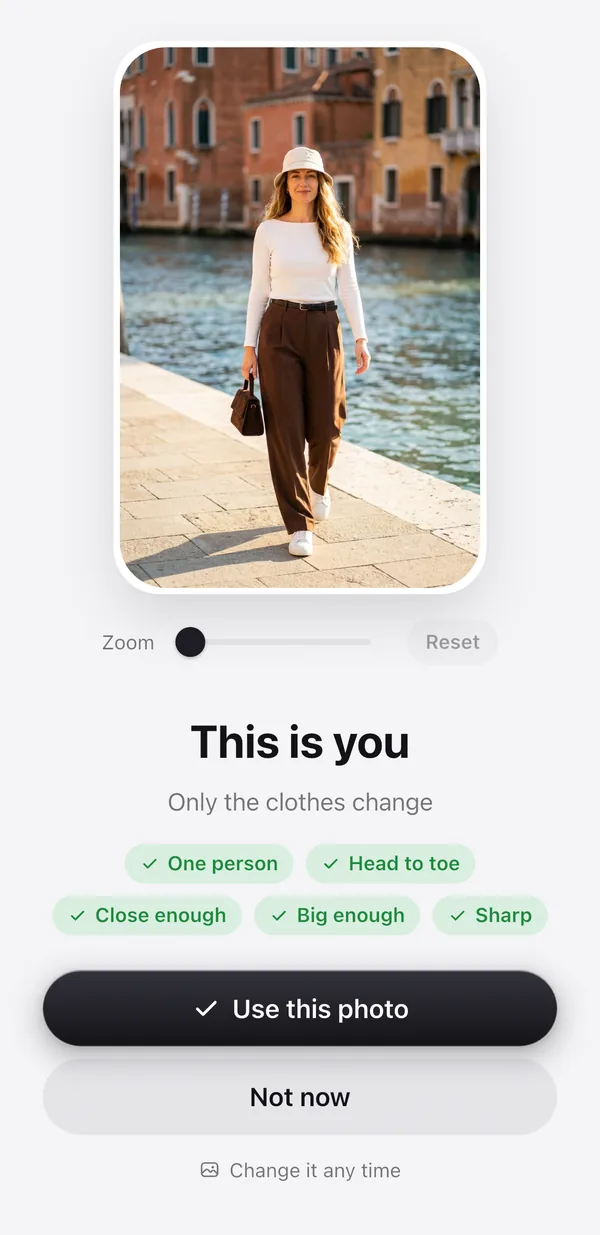
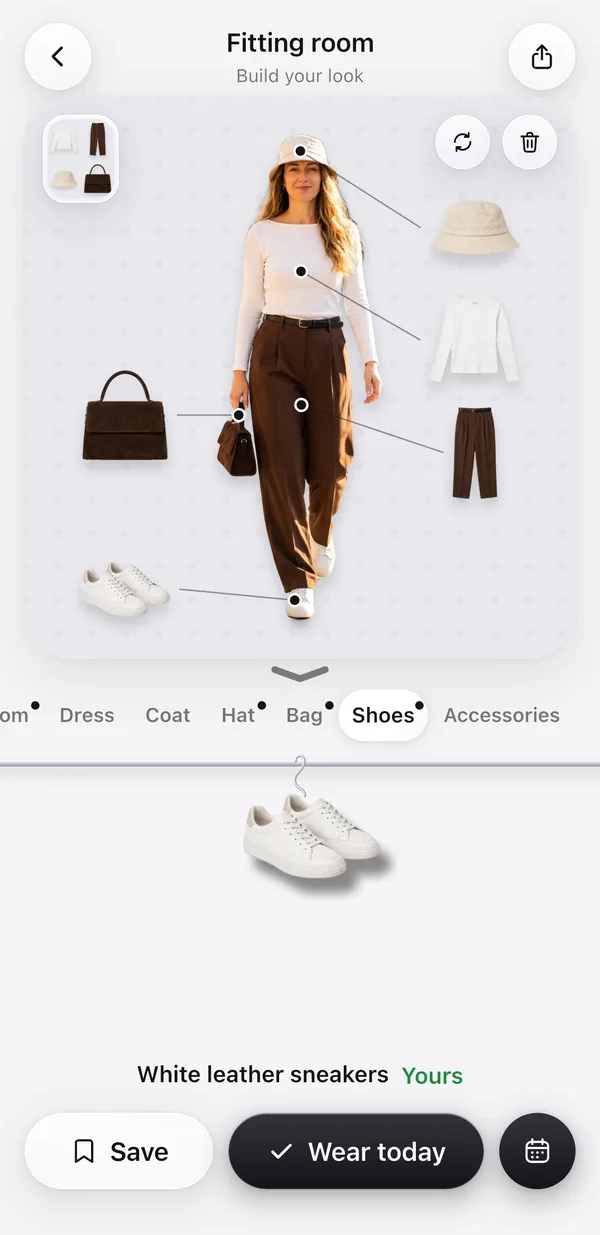
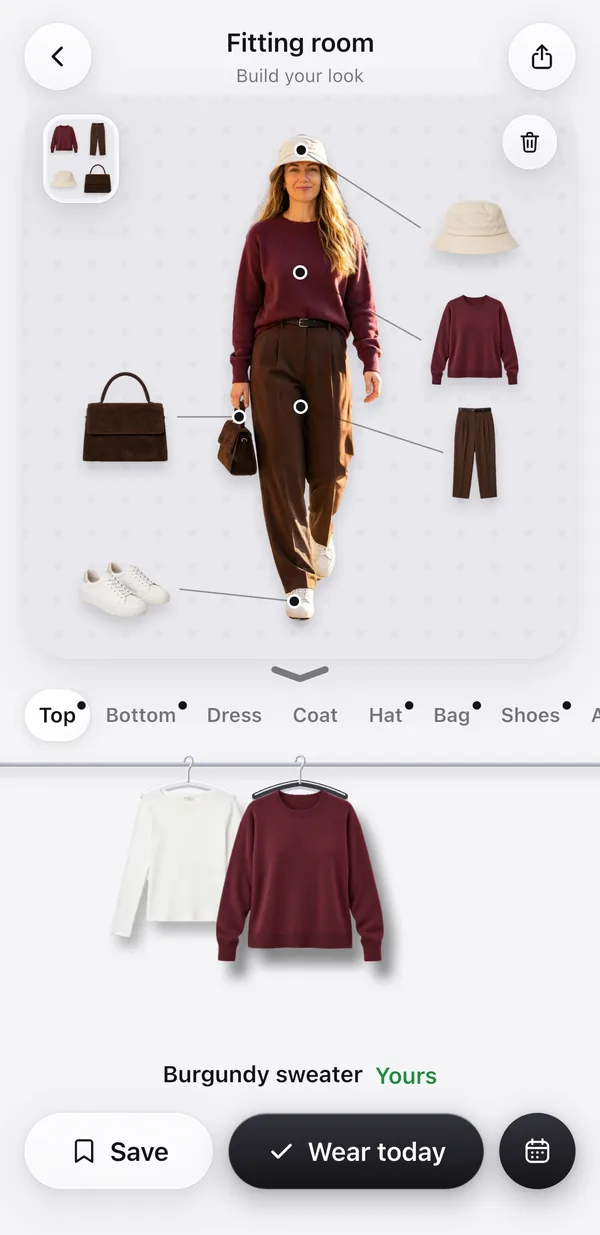
Preview any closet outfit free in the lookbook, or render it directly on your photo with Create with AI.
Get it on the App StoreGet it on Google Play
Free up to 100 pieces · No ads · On-device privacy · iPhone, iPad & Android
The model shown above is AI-generated, not a real person. The try-on is an unretouched run of StyleTwin’s Create with AI: her white top was swapped for a burgundy sweater from the closet while her face, hair, hat, trousers, bag, sneakers and Venice background remained untouched.
Free Lookbook vs. Create with AI virtual try-on
| Feature | Free Lookbook | Create with AI (Virtual Try-On) |
|---|---|---|
| Visual style | Your cut-out silhouette beside each garment | Realistic photo of you wearing the selected outfit |
| Cost | Free and unlimited | 1 AI credit per picture (5 free in first 2 weeks) |
| Processing | 100% on-device | Sent to OpenRouter only after your permission |
| Face & background | Unchanged | Instructed to swap clothes only |
| Speed | Instant | Typically under 60 seconds |
Want a step-by-step walkthrough of how See it on you works inside the app? Read our See it on you feature guide. If you want to turn an existing outfit selfie into individual closet items first, explore Lift with AI.
Privacy-first photo tips for accurate try-on
- Even, front-facing light. Stand facing a window or bright lamp so shadows do not hide garment proportions or colors.
- Full-body portrait framing. Include your head through your shoes with a little breathing room above and below so trousers, coats and footwear render naturally.
- Simple fitted base outfit. Wearing a simple tee and straight trousers or leggings helps AI drape structured coats, sweaters or dresses cleanly over your real proportions.
- Zero-upload browser test. The photo-readiness checker at the top of this page runs completely inside your browser canvas — your image never leaves your device.
Privacy & credits — good to know
- Free to download on iPhone, iPad (iOS 17.6+) and Android (Android 12+) with no ads and up to 100 closet pieces free.
- New users receive 3 free AI pictures right away plus 1 on day 7 and 1 on day 14 (5 free total). Optional StyleTwin Plus ($39.99/year or $9.99/month) includes 10 AI pictures every month.
- Failed AI renders automatically refund their credit.
- For Create with AI, photos are deleted from our server within 48 hours and are never used to train AI models.
Questions
Can I try clothes on a photo of myself for free?
Yes. On this page you can preview the live try-on wipe and run a private on-device photo readiness check for free with no sign-up. Inside the free StyleTwin app, the Lookbook view is always free and unlimited, and new users get 3 free AI virtual try-on pictures right away plus 2 more in their first two weeks.
Does StyleTwin use a 3D avatar or my real photo?
StyleTwin uses your real photo, not a cartoon or synthetic avatar. Create with AI swaps only the clothing items you selected while preserving your face, hair, body proportions and background.
What makes a good virtual try-on photo?
A sharp, well-lit portrait photo showing one person from head to toe at 800 px or higher on the shorter edge. Avoid heavy backlighting, cropped feet, or busy mirrors. You can verify resolution, brightness and portrait framing locally in the tool above.
Is my photo uploaded when I test it on this page?
No. The browser photo-readiness checker inspects your image locally using your device’s canvas and never sends the file to any server.
How does StyleTwin protect my photos inside the app?
Your closet pieces and full-body reference photo stay stored on your phone. A photo leaves your device only when you explicitly request Create with AI; our server deletes it within 48 hours and never uses your photos to train AI models.
Can I try on outfits I planned for the week or for a trip?
Yes. Any outfit built in your digital wardrobe, scheduled in your outfit planner, or generated by the AI outfit generator opens directly in See it on you with one tap.
StyleTwin is free on iPhone, iPad and Android.
Get it on the App StoreGet it on Google Play
Free up to 100 pieces · No ads · On-device privacy · iPhone, iPad & Android